Writing an ECC client
EXPERIMEDIA’s baseline technologies provide the technologist and experimenter a set of FMI technologies for integration within both the content and experiment lifecycles. From a purely experimental point of view, the experimenter will have access to a number of metrics already available for use from the baseline components themselves. For a list of these metrics, see section . It is anticipated that additional metrics, based on observations of the behaviours of the new technologies brought to the EXPERIMEDIA baseline (or users associated with their use), will also need to be captured. In the follow sections, we will explore how an ECC client can be developed to communicate metrics during the experimental process described in section . In the following sections, we look at a general monitoring pattern suggested for ECC client writers; the principal (Java ) classes that are used by a client; a review of two sample clients provided in the ECC API; how to test a client; and finally a review of the indicative sample code.
Basic monitoring pattern
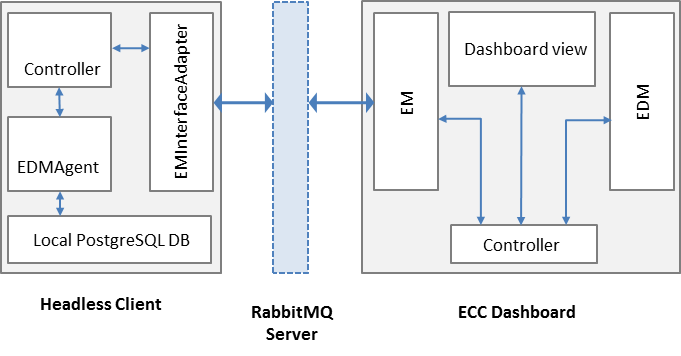
Figure 9 : Client/ECC high-level monitoring pattern
The basic monitoring pattern recommended for client writers is illustrated in . Here, we see the ‘Headless client’ (a client with no user interface) connected to the ECC (and its dashboard) via a RabbitMQ server. This client uses the EMInterfaceAdapter class (see ) to help handle the messages passing executed during the experimental phases. Its controller responds to the essential requests for information via the adapter and, during Live Monitoring and Post Reporting phases, uses an instance of the EDMAgent to help manage its metric data. Meanwhile, the ECC handles in-coming and out-going messages via the Experiment Monitor (EM) sub-component; stores all metric data it receives from the client using its Experiment Data management (EDM) sub-component; and presents the experimental process to the user via the dashboard view.
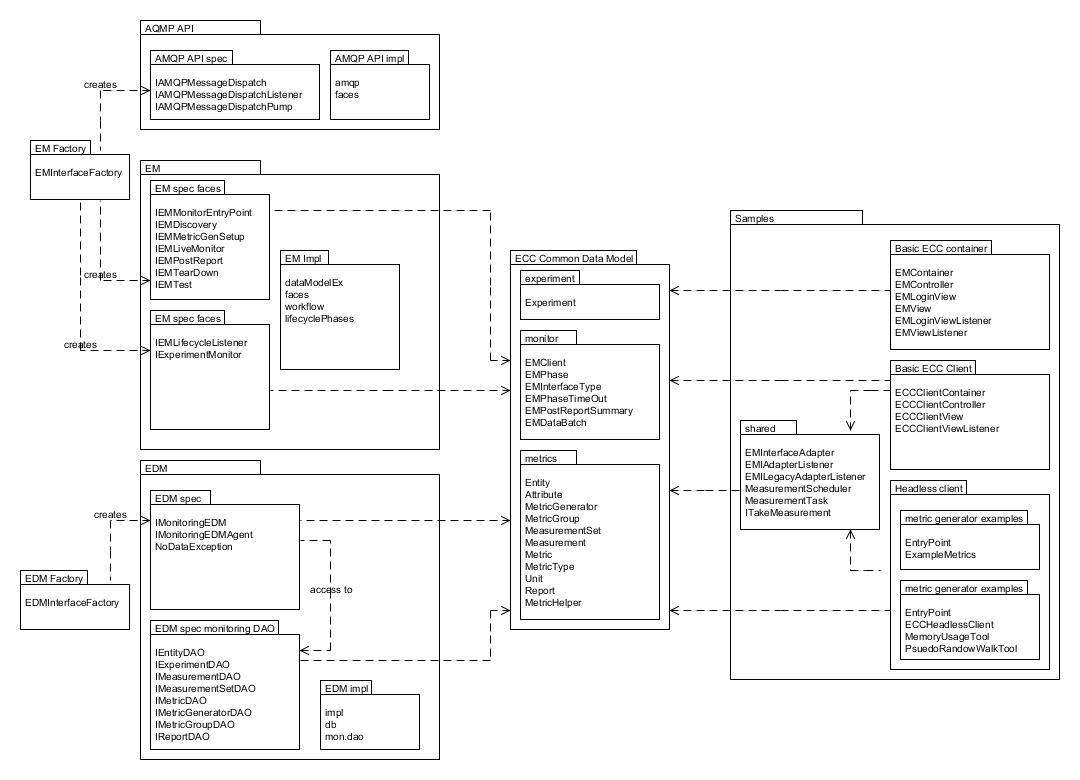
Figure 10 : Client writing classes overview
Client writers are likely to encounter many, or all, of the classes presented in – relevant ECC API packages are presented on the left and centre; example client code on the right. Each client will use the factory classes to create ECC interface classes that provide access to the monitoring protocol classes (within EM) and the experiment data management classes (EDM). Common data classes shared by all scopes illustrated above provide the fundamental data types to be exchanged and populated during an experimental process. The ‘ Basic ECC container ’ sample is a desktop testing for early development phases that provides ‘bare bones’ ECC server behaviour (it still requires a RabbitMQ server to be installed) and a means by which basic communication can be tested. For more information on the use of this tool, see technote ‘ T05 ECC sample notes V1.0 ’ packaged within the API. Software engineers should review these classes and their use through reading the JavaDoc provided in the ECC API. The bundled example clients (‘Basic ECC Client’ and ‘Headless Client’) are described in more detail below.
ECC example clients
It is relatively simple to start writing your own ECC client. Interested developers should first look at one or both of the following sample client projects:
| Client | Description |
| Basic ECC Client | A simple client that generates only one metric at run-time. This client can push (via the user interface) and pull this metric data. It does not store any of its metric data locally or support the Post Reporting phase. Look at this client first before looking at Headless client. |
| Headless ECC Client | The headless client is indicative of the kind of implementation that might be suitable for running on a server. No user interface is provided. This client uses the ECC’s IMonitoringE DMAgent interface to store its metric data on a PostgreSQL data and also the MeasurementScheduler to automate the regular collection of metric data. Live Monitoring and Post Reporting is fully supported; review this sample to see how the use of the IMonitoringEDMAgent helps you manage your metric data and communication with the ECC. |
| Dynamic Entity Demo ECC Client | An extended version of the Basic ECC Client that allows the user to dynamically created Entities at any point after the experiment process has started. Users can enter details of new entities and their attributes via a desktop UI; new entities and attributes are created and sent to the ECC. Dummy metric data is provided by the client for all new entities/attributes. |
| Basic Android Client | This is a simple client that demonstrates integration with the ECC on the Android 4.2.x platform. This client provides a basic UI with which the user can select the IP of the RabbitMQ server and then later push a simple metric to the ECC. For more information on the specific build process for this client (which requires Google’s Android SDK, please see the README). |
| Basic .Net Client | A simple C# client that works in a similar way to the Java based Headless ECC Client (this client API does not yet provide local EDM metric database support). This client runs from the command line. |
| Basic C++ Client | A simple C++ client that works in a similar way to the .Net/Java headless clients (this client API does not yet provide local EDM metric database support). This client runs from the command line. |
All sample code can be found at the top level of the ECC API under the folder ‘samples’. As a new client writer you may wish to adopt a similar pattern to the clients found here (by using the EMInterfaceAdapter class and listening to its events as described by EMIAdapterListener); more experienced software engineers may wish to directly use the ECC protocol interface classes hidden by the EMInterfaceAdapter themselves.
For the sake of brevity, the specifics of the more recent ECC clients (Android; .Net; C++) are not detailed here since the application very closely follows the pattern adopted by the Java Basic ECC and Headless ECC clients.
Client samples in more detail
A high-level class view of the client code samples (both ‘basic’ and ‘headless’) can be seen in the figure below:
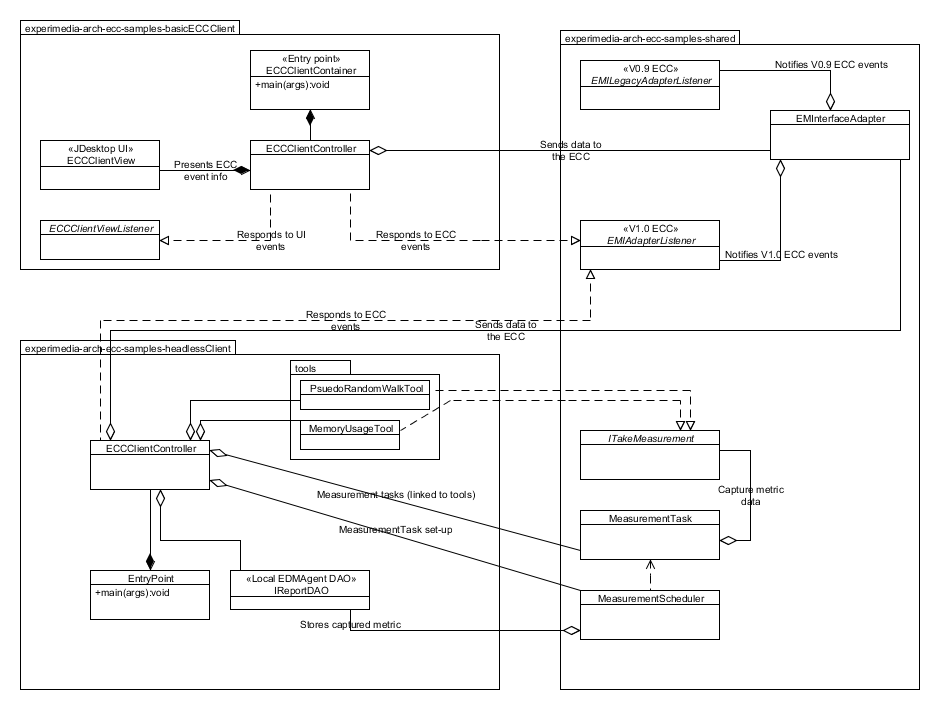
Figure 11 : Client class interactions for sample code
As indicated in , both client samples share the use of adapter classes (a legacy class adapter is also provided in the shared package, but this is now deprecated). An MVC architecture is applied in the Basic ECC Client ; the headless client does not require this structuring. The ‘tools’ sub-package demonstrates how individual classes can be used to encapsulate actual measurement behaviour which can be abstracted scheduled as required.
Class roles
The roles of each class in the client sample code are as follows:
ECCClientContainer (basic)/EntryPoint (headless) classes
Both classes simple act as the entry point for the client application. In addition to this, the ‘headless’ entry point class demonstrates how property files can be used to set up connection to the ECC and create a local EDMAgent , see section for more information.
ECCClientController (Basic client only)
This class co-ordinates ‘high level’ ECC monitoring actions and event handling that is conducted via the EMInterfaceAdapter class. Actions include registering (or ‘connecting’) with the ECC; sending metric generator information; responding to set-up and tear-down processes. In the ‘basic’ client, the controller sends message information to the UI and responds to a simple user interaction.
ECCClientView (Basic client only)
This view class implements a Java desktop window containing a ‘logging’ panel and a button with which the user can manually push metric data to the ECC during the live monitoring phase .
ClientViewListener (Basic client only)
Listening to events generated by the EMClientView is implemented by the ECCClientController using this interface.
EMInterfaceAdapter
Simplified interaction with the ECC is achieved through the use of this adapter and its listening interface ( EMIAdapterListener ). The EMInterfaceAdapter hides some of the more ‘technical’ aspects of communicating with the ECC as a client. These aspects include: setting up interfaces that communicate with the ECC during different phases on an experiment; listening directly to events sent by the ECC to the client; sending data to the ECC. More information about the use of these interfaces can be found in the ECC API JavaDoc.
EMIAdapterListener
The EMIAdapterListener is implemented by the ECCClientController and is used to respond (at a high level) to the requests of the ECC.
ECCHeadlessClient (Headless client only)
This class is analogous to the ECCClientController found in the basic client code, however, instead of managing a UI, it instead schedules metrics for measurement and stores the data in a local database managed by an EDMAgent (see IMonitoringEDMAgent ). Please note that this class can work without invoking the EDMAgent, but it will not be able to respond properly to the ECC’s requests for missing data during the Post-Reporting phase as no local storage has been set aside for metric data. In this case, the headless client will simply create metric data ‘on-the-fly’ and respond with this information when the ECC requests it.
EDMAgent: IMonitoringEDMAgent & IReportDAO (Headless client only)
An EDMAgent is constructed using the ECC’s EDMInterfaceFactory static class; the agent is then tested to see if a database is available for use and an IReportDAO instance is created. The IReportDAO instance provides the client with the facility to store metric data as it is generated (in report form) and then later retrieve it as required (an example of this can be seen in the ‘ onPullMetric(…) ’ event implemented by ECCHeadlessClient ). The same instance of the IReportDAO is used during the setting up of a scheduled measurement activity (see the ECCHeadlessClient method ‘setupMeasurementForAttribute(…)’ for further information); this allows a background thread to continuously feed the EDMAgent with new metric data as it arrives.
Tools: PsuedoRandomWalkTool & MemoryUsageTool (Headless client only)
Two trivial metric producing classes (both implementing the ITakeMeasurement interface) have been supplied for use in the headless client. The PsuedoRandomWalkTool class simulates the change in direction a walker might take on a random path (providing their direction in degrees: 0:-359). The MemoryUsageTool takes a rough estimation of the memory being used by the headless client at run-time.
More advanced client programming
The ECC provides client writers with a number of more advanced levels of control over the way their client interacts with the ECC - these features are outlined below. For more detailed information, please read the inline documentation.
Metric PULL semantics
Metrics that will be pulled from the client by the ECC can be scheduled and limited by the client. When a client constructs its metric model, it creates MeasurementSets that are associated with an Entity’s attribute. Using the MeasurementSet class, the client is able to:
- Set a limit on the number of times the ECC can ask for metric data for this set [see MeasurementSet.setMeasurementRule(..) & MeasurementSet.setMeasurementCountMax(..)]
- Set the frequency at which the ECC will ask for metric data for this set [see MeasurementSet.setSamplingInterval(..)]
Entity enabling and disabling
Some clients may wish to signal to the ECC that want to enable or disable an Entity during the live monitoring process. The meaning of this is as follows:
- Enabled entities. Pushed metrics will be captured and stored by the ECC. If the client supports pulling, the ECC will issue pull requests for metrics associated with the entity
- Disabled entities. Any pushed metrics associated with the entity will be discarded by the ECC. The ECC will not make pull requests for any metrics associated with the entity
Client writers can send ‘enable’ or ‘disable’ signals to the ECC by using the ECC adapter call EMInterfaceAdapter.sendEntityEnabled(..).
Testing clients against the ECC
To manually test the existing client samples, follow these steps:
Open a command line at the root of the ECC API folder
Type: mvn clean install
Create two folders (elsewhere in your file system):
- client
- container
Search for all JARs created in the root folder of the ECC API folder
Copy all JARs (ignoring duplicates found in the dashboard) to both folders created in step 3.
- Start the Basic ECC Container in the container folder by running the following JAR::
experimedia-arch-ecc-samples-basicECCContainer-<version>.jar
Start the Basic ECC Client or Headless client in the client folder by running the following JAR:
experimedia-arch-ecc-samples-basicECCClient-<version>.jar

experimedia-arch-ecc-samples-headlessECClient-<version>.jar
Alternatively, look in the ‘bin’ folder of the ECC root directory for pre-compiled demos.
Indicative code
Developers are directed to the following code sections for each of the experiment phases supported by the sample client code.
Connecting/Disconnecting with the EM
| High-level handling | Lower-level handling |
EMClientController.onEMConnectionResult() EntryPoint.initialiseClient() ECCHeadlessClient.tryConnectToAMQPBus() ECCHeadlessClient.tryRegisterWithECCMonitor() ECCHeadlessClient.onConnectionResult() ECCHeadlessClient.onEMDeregistration() |
EMInterfaceAdapter.registerWithEM() EMInterfaceAdapter.disconnectFromEM() EMInterfaceAdapter.getExperimentInfo() |
Discovery phase
| High-level handling | Lower-level handling |
Basic/Headless . onPopulateMetricGeneratorInfo() Basic/Headless.onDescribeSupportedPhases() Basic/Headless.onDescribePushPullBehaviours() Basic/Headless.onDiscoveryTimeout() |
EMInterfaceAdapter.onCreateInterface() EMInterfaceAdapter.onRegistrationConfirmed() EMInterfaceAdapter.onDeregisteringThisClient() EMInterfaceAdapter.onRequestActivityPhases() EMInterfaceAdapter.onDiscoverMetricGenerators() EMInterfaceAdapter.onRequestMetricGeneratorInfo() EMInterfaceAdapter.onDiscoveryTimeOut() EMInterfaceAdapter.onSetStatusMonitorEndpoint() |
Set-up phase
| High-level handling | Lower-level handling |
Basic/Headless.onSetupMetricGenerator() Basic/Headless.onSetupTimeOut() |
EMInterfaceAdapter.onCreateInterface() EMInterfaceAdapter.onSetupMetricGenerator() EMInterfaceAdapter.onSetupTimeOut() |
Live-monitoring phase
| High-level handling | Lower-level handling |
Basic/Headless.onLiveMonitoringStarted() Basic/Headless.onStartPushingMetricData() Basic/Headless.onPushReportReceived() Basic/Headless.onPullReportReceived() Basic/Headless.onStopPushingMetricData() Basic/Headless.onPullMetric() Basic/Headless.onPullMetricTimeOut() Basic/Headless.onPullingStopped() |
EMInterfaceAdapter.onCreateInterface() EMInterfaceAdapter.onStartPushing() EMInterfaceAdapter.onReceivedPush() EMInterfaceAdapter.onStopPushing() EMInterfaceAdapter.onPullMetric() EMInterfaceAdapter.onReceivedPull() EMInterfaceAdapter.onPullMetricTimeOut() EMInterfaceAdapter.onPullingStopped() |
Post-report phase
| High-level handling | Lower-level handling |
Basic/Headless.onPopulateSummaryReport() Basic/Headless.onPopulateDataBatch() Basic/Headless.onReportBatchTimeOut() |
EMInterfaceAdapter.onCreateInterface() EMInterfaceAdapter.onRequestPostReportSummary() EMInterfaceAdapter.onRequestDataBatch() EMInterfaceAdapter.notifyReportBatchTimeOut() |
Tear-down phase
| High-level handling | Lower-level handling |
Basic/Headless.onGetTearDownResult() Basic/Headless.onTearDownTimeOut() |
EMInterfaceAdapter.onCreateInterface() EMInterfaceAdapter.onTearDownMetricGenerators() EMInterfaceAdapter.onTearDownTimeOut() |
ECC specification files
EM configuration
Connection to the ECC can be configured using an em.properties file, described below:
| Property label | Description | Example |
| Rabbit_IP | IP of RabbitMQ server | Rabbit_IP=127.0.0.1 |
| Rabbit_Port | Port number of RabbitMQ server | Rabbit_Port=5672 |
| Monitor_ID | UUID of ECC monitoring service | Monitor_ID=00000000-0000-0000-0000-000000000000 |
| Rabbit_Use_SSL | True if SSL connection is required | Rabbit_Use_SSL=true |
| Rabbit_Keystore | Path to Java keystore file | Rabbit_Keystore= /main/resources/rabbitKeyStore.jks |
| Rabbit_KeystorePassword | Password for keystore file | Rabbit_Keystore=rabbit |
EDM configuration
Configuring an EDMAgent (to store metric data in a local PostgreSQL database) can be specified using an edm.properties file, described below:
| Property label | Description | Example |
| dbURL | URL of PostgreSQL server | dbURL=localhost:5432 |
| dbName | Database ID used to store metrics | dbName=agent-edm-metrics |
| dbUsername | Username to access metric database | dbUsername=postgres |
| dbPassword | Password to access metric database | dbPassword=password |
| dbType | Database type (currently only PostgreSQL) | dbType=postgresql |
Dashboard configuration
The ECC dashboard requires both EM and EDM configuration files (see above) to correctly initialise. Further configuration of the dashboard can be found in the dashboard.properties file, described below:
| Property label | Description | Example |
| Nagios.fullurl | URL of a deployed NAGIOS service | nagios.fullurl=http://username:password@host/nagios |